Tuesday, April 22, 2014

What is a custom recovery and how to install one with minimal time

A custom recovery is  a special interface in the phone which can be accessed by a special key combination. This interface allows you to do many things like installing custom roms, kernel zips and many more. Examples of really popular recoveries are ClockWorkMod Recovery, Team Win Recovery Project ( TWRP ) and Philz Recovery


 Team Win Recovery Project (TWRP )

 TWRP is a fairly good recovery with a really good and simple interface. Options aren't that complicated and you will be sure to love this recovery

ClockWorkMod Recovery

The first custom recovery ever made for phones. This recovery is a really simple one to use but the only downside is that its interface is only controllable through the volume buttons. Overall, an okay recovery to use


Philz Recovery

A fairly new competitor in the recovery competition, Its interface is very interesting as it is a full touch screen interface like TWRP recovery. Many options to choose from to satisfy your needs.


How to install a custom recovery (Only works if rooted )

1st step

Download the Recovery Tools app from the Google Play Store

2nd step

Open the app and grant the app root access


It will look something like this


3rd step

Click on the tab that says ' Flash Recovery'
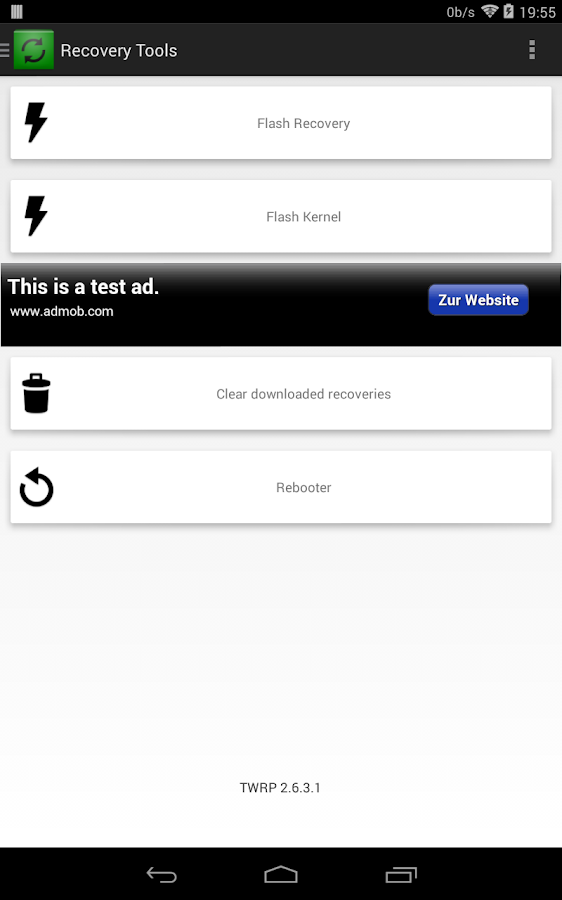

[ROOT]Recovery Tools - Flasher - screenshot


4th step

Choose your desired recovery
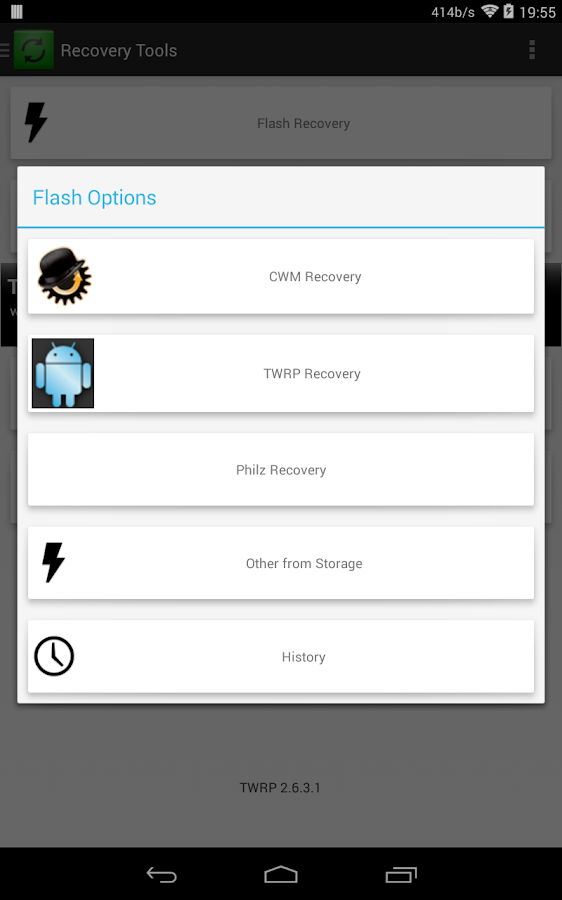


[ROOT]Recovery Tools - Flasher - screenshot


6th step

Choose the latest version of the recovery and hit start

7th step

Just check out your new recovery by hitting on the ' Rebooter ' tab and hit the ' Reboot to recovery' tab and just wait 


I hope this tutorial was helpful and it would benefit you in the future. Please like, subscribe and comment and as always,

GO ANDROID!!!!


Approved by happy jumping Android


Tuesday, April 15, 2014

Lag, why you do what you do and how to solve it

Lag, the abomination of all phones. It happens to all phones ranging all the way up to high class phones like the Galaxy S4. Since you readers out there have a problem with it, let's talk about it.
When your phone lags


What causes lag

Lag is caused when there are too many applications running in the background. Like say you entered Angry Birds and you wanted to chat with your friends on Facebook and so you change to Facebook. What you didn't know is that Angry Birds is still running but it is not being used. As you continue to swap to other applications in a short amount of time, the apps in the background will take up a lot of RAM in your phone which causes a shortage of performance.

What apps cause the most lag

Since I used my phone for gaming, texting and other apps I noticed that the app which causes the most amount of lag is 神魔之塔, which is Tower of Saviours in the chinese language and its also a wonderful game. Other apps like Facebook, Twitter and even the Youtube app can cause a lot of lag to low-end phones as well as high-end phones.

How to avoid and prevent lag on phones

There are a handful of apps which can help resolve lag like Clean Master or 360 Security which will clean up apps which are running in the background. This are the best ways of decreasing lag through a normal user's way. There is also rooting your phone. Tutorials are linked here. Rooting can give the user to ramped up his processor to decrease lag and rooting can also help in lag by deleting bloatware as it slows down your phone tremendously.

I hope that lag doesn't haunt your phone ever again, Stay tuned next time to AndroboticsMalaysia and please feel free to comment, like and subscribe. PEACE


Monday, April 14, 2014

In a nutshell : ROOT, ROOTING, ETC

What's  "ROOT"


First of all root is a type of permission granted by Android to certain applications to allow them to use the device's whole functions meant for developers and coders to be used by an average user who wants the true potential of their Android device.

How do I "ROOT"

Rooting can be done through special files which can be obtained on the web from sources such as 
Xda Developers and more.But remember, make sure you found the right file for the right phone as a mistake from that can potentially mess up your phone.Root can also be done through a special file and also an application called ODIN, which is aimed at developers and other people.

Is "ROOT" safe


Root is safe but the only downside is that it voids your warranty. It means that if you were to screw up in any way possible after rooting, Samsung or the manufactures will not help you in your problem. 

What does"ROOT" do

First of all, root will add an application to your app drawer called " Superuser".This application will allow users to allow or deny root permissions from apps in the phone. Through this application, you will be able to gain access to many features of your phone which you have never imagined like overclocking, which is boosting the processor of your phone to its potential,. It can also lead to a whole new range of customization through apps like Gravitybox and many more.

Superuser


I hope that your phone will be safe after rooting it. Please subscribe,like and comment for improvements in the future, Thank you and have a nice day.


Tuesday, April 8, 2014

How to root the Samsung Galaxy S3 (GT-I9300)

CAUTION!!! IF YOU DON'T WANT TO VOID YOUR WARRANTY OR ANYTHING GOING WRONG AFTER THE ROOTING PROCESS BECAUSE OF YOUR MISTAKES,DON'T READ ON

1st step

Get the files from this link below

ODIN 3.07(MUST DOWNLOAD):Here
ROOT FILES(MUST DOWNLOAD):Here
(Make sure you download all the files as it will be vital for the next step)

2nd step

Go to your device and head to settings,scroll down all the way to about phone,open it and find the build number.From there,tap the build number until you see that developer options are enabled.Get back to the main page and enter the developer options.From there, scroll down to USB debugging  and enable it.

3rd step

Open ODIN3.07 on your computer.

4th step

Head to your phone and hold the volume down,home and the power button until you see a page call "DOWNLOAD MODE"
Download Mode

5th step

Press the volume up button and head on to the next page when you should see a Android droid logo like this one below

6th step

Plug your phone to your computer and open ODIN.From there you should see something like this

If the number  a.k.a (ID:COM)  is present,you are set to root

7th step

Click on the PDA icon and search for your Root file


8th step

Click on start and just wait there
(DURING THE PROCESS,NEVER UNPLUG THE CABLE FROM THE PHONE)

Once this page comes out,you can unplug the cable from the phone


Once your phone boots up,head to your app drawer and see whether you have the Superuser app.It looks like this


And thats it,you are rooted


(IF THERE ARE ANY PROBLEMS WITH THE STEPS,FEEL FREE TO COMMENT BELOW AND DON'T FORGET TO LIKE AND FOLLOW MY BLOG)


Monday, April 7, 2014

Review:AOKP(Android Open Kang Project) ROM

Since day one from rooting my Samsung Galaxy S3,the name AOKP has been going on amongst social networks of mine and after constantly being bugged by my cousin who is like a major fanboy of this custom ROM,I decided to try it out.

Unicorn Power( AOKP Logo )

When I first flashed the ROM,I thought is was just going to be a stock-like android interface but as I went through the settings,I was surprised to see so many things a user can do to his or her phone.The moment you enter the ROM,the ROM will knock your socks off with its many features like LED notification tools,customization of almost aspect of the ROM from color to the lines of the menus and also the ability to change and modify each icon,each animation and many more.This ROM isn't meant for basic users NO! This ROM is meant for hardcore users with the imagination and goal to customize and tweak their phone's interface to its limit.But all jokes aside,this is so far the best ROM i could have ever flash to bring my old Samsung Galaxy S3 to its peak level to compete with the phones in 2014.

I kid you not,you really have to flash this ROM to know its full potential.

Thank you for reading,and peace.


Links for getting the ROM:

Search for your device at:-

Tutorial for flashing ROMS

Thursday, April 3, 2014

Start of blog

Hi,welcome to my blog ANDROBOTICSMALAYSIA!!!

           This blog will discuss about Android,the operating-system and all its content like devices,custom roms and many more.


Hope u guys and girls will think this blog is helpful and Happy READING.


Salute
Salute,my fans