A custom recovery is a special interface in the phone which can be accessed by a special key combination. This interface allows you to do many things like installing custom roms, kernel zips and many more. Examples of really popular recoveries are ClockWorkMod Recovery, Team Win Recovery Project ( TWRP ) and Philz Recovery

Team Win Recovery Project (TWRP )
TWRP is a fairly good recovery with a really good and simple interface. Options aren't that complicated and you will be sure to love this recovery
ClockWorkMod Recovery
The first custom recovery ever made for phones. This recovery is a really simple one to use but the only downside is that its interface is only controllable through the volume buttons. Overall, an okay recovery to use

Philz Recovery
A fairly new competitor in the recovery competition, Its interface is very interesting as it is a full touch screen interface like TWRP recovery. Many options to choose from to satisfy your needs.
How to install a custom recovery (Only works if rooted )
1st step
Download the Recovery Tools app from the Google Play Store
2nd step
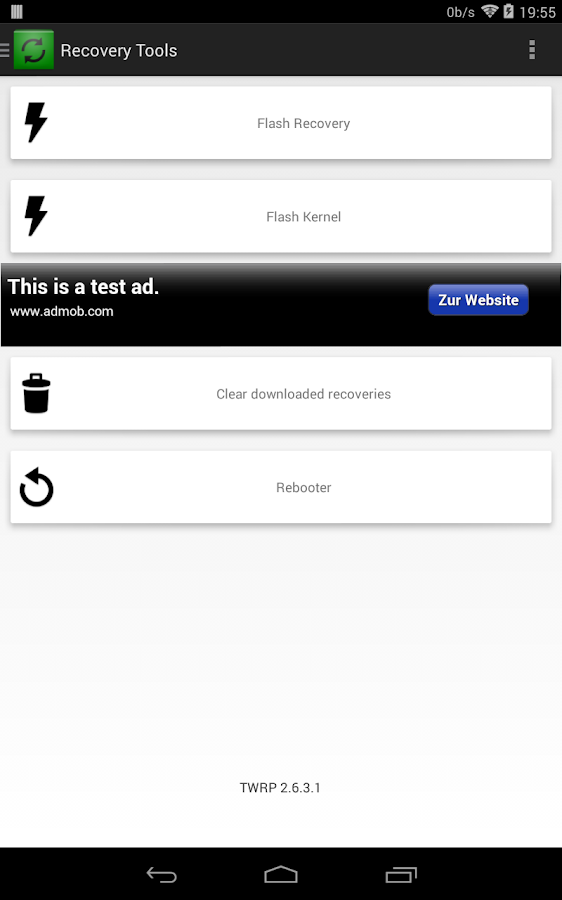
Open the app and grant the app root access |
| It will look something like this |
3rd step
Click on the tab that says ' Flash Recovery'
4th step
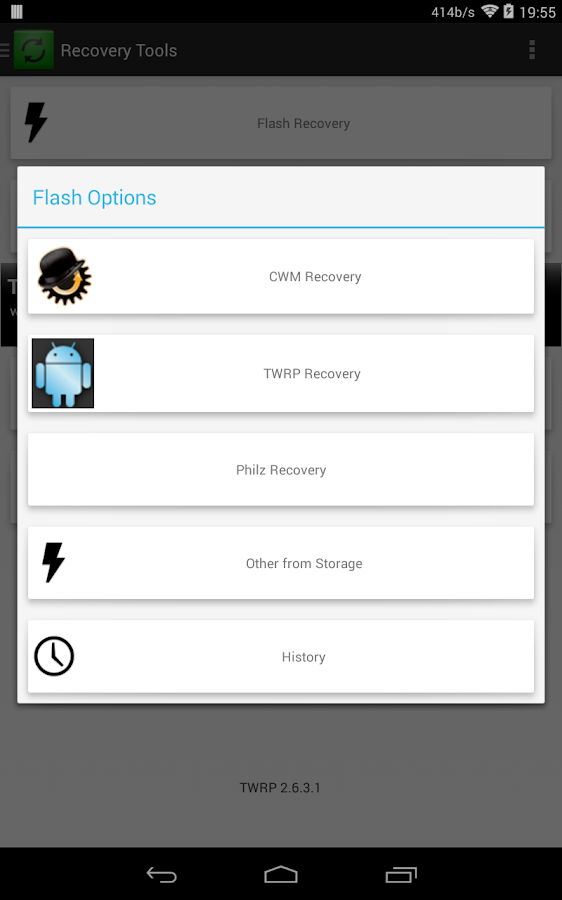
Choose your desired recovery
6th step
Choose the latest version of the recovery and hit start
7th step
Just check out your new recovery by hitting on the ' Rebooter ' tab and hit the ' Reboot to recovery' tab and just wait
I hope this tutorial was helpful and it would benefit you in the future. Please like, subscribe and comment and as always,
GO ANDROID!!!!
 |
| Approved by happy jumping Android |

No comments:
Post a Comment